
Playtech
Platform
Moblers successfully supported Playtech in the development of a native Android SDK designed to integrate seamlessly with their .NET Avalonia application.
The engagement focused on authentication at scale — giving Playtech a unified way to verify users across terminal and mobile contexts without compromising security or user experience.
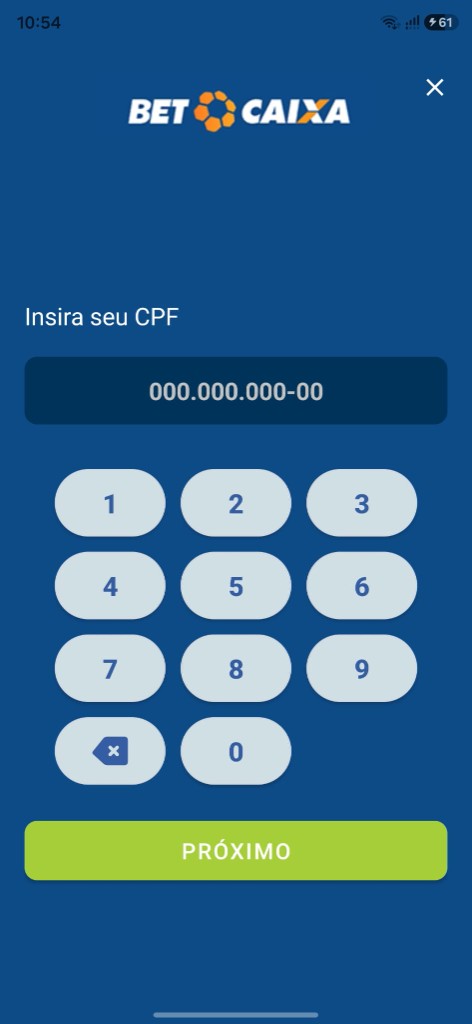
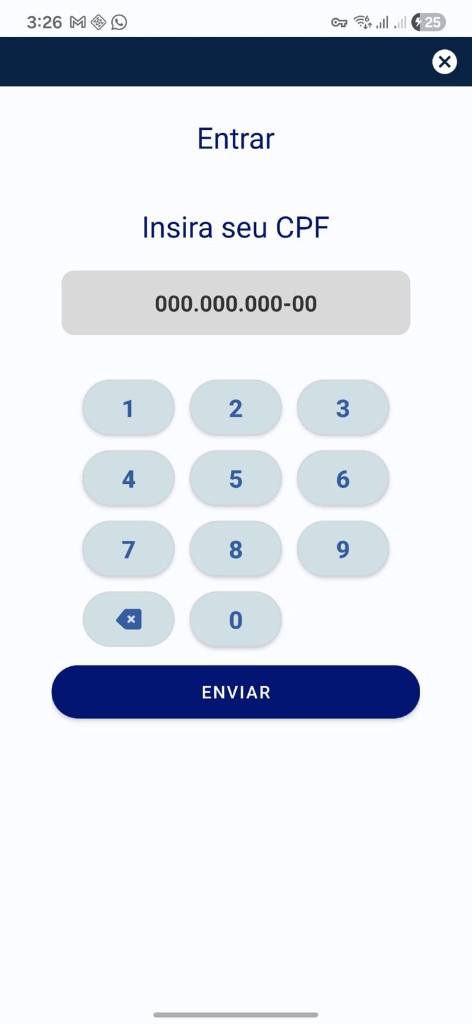
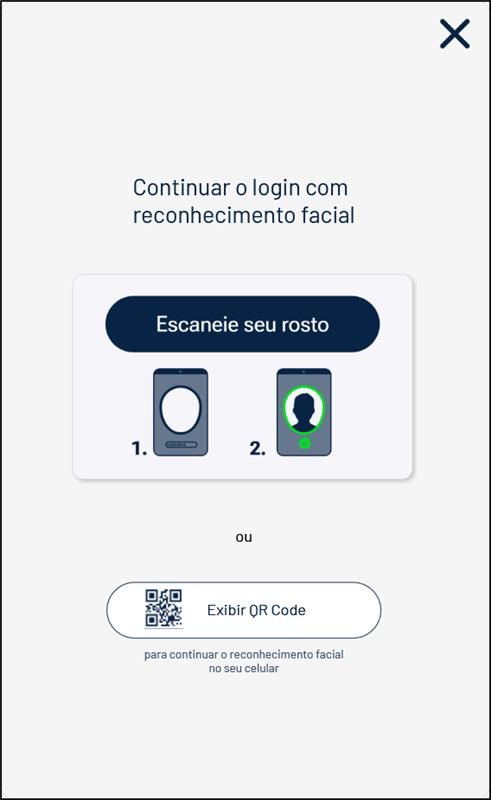
Moblers built and integrated a comprehensive authentication solution inside the SDK, plus two dedicated native Android applications focused on facial recognition and identity verification — optimized for performance, reliability, and enhanced security compared to generic web-only flows.
Services
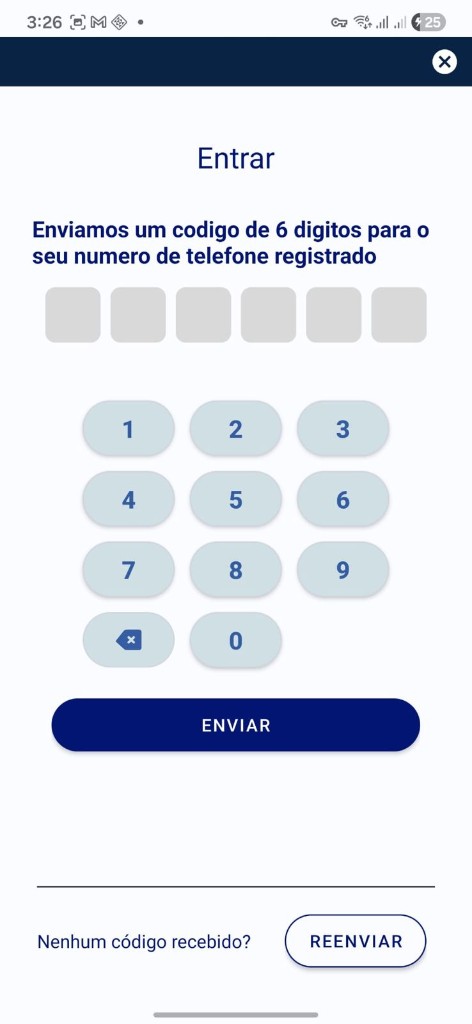
Standard username/password with OTP
Secure credential login with one-time password verification for step-up authentication.
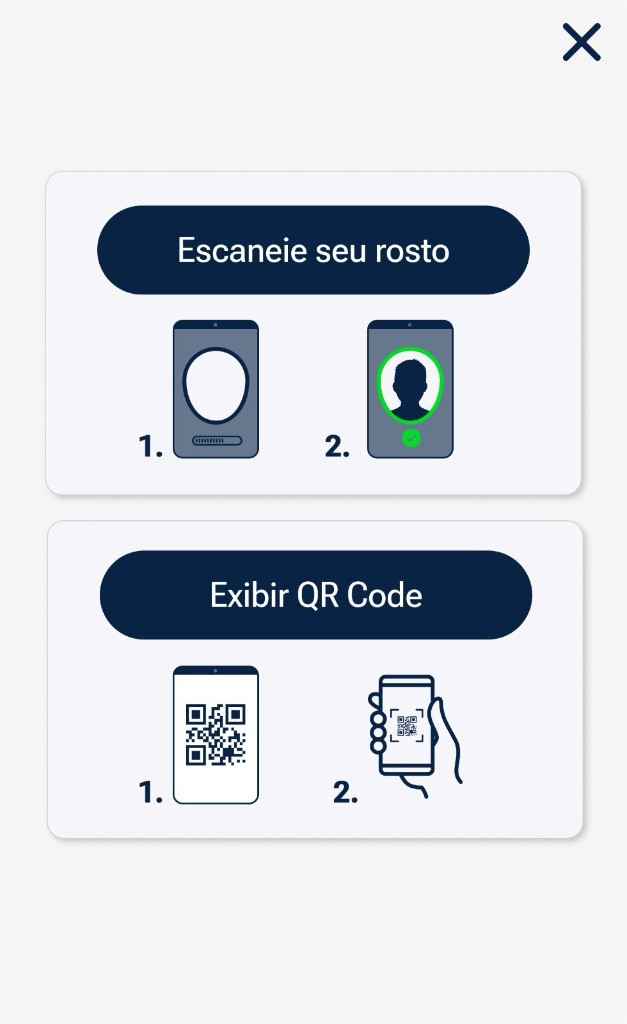
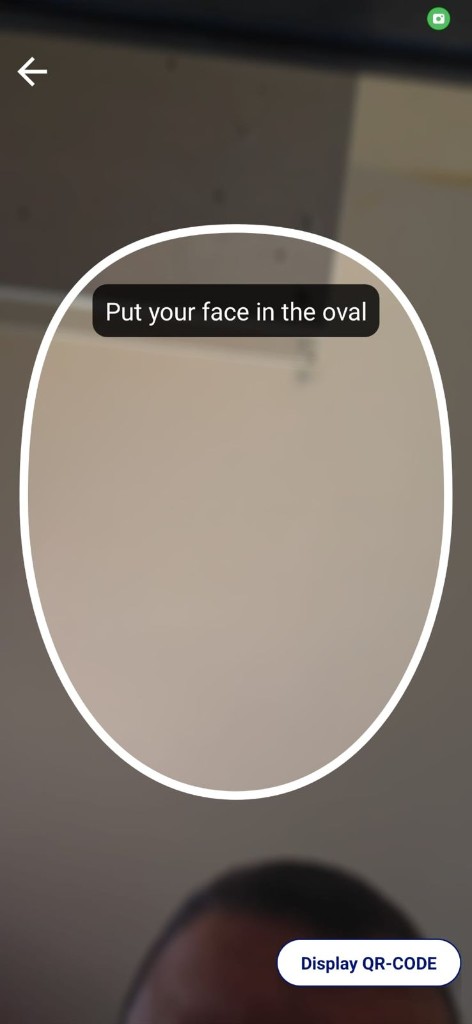
Facial authentication (CAF & Unico)
Biometric identity verification through two integrated providers — supporting flexible deployment and regional requirements.
Internal registration workflows
Guided onboarding flows for new user accounts within the Playtech ecosystem.
Cross-device authentication
When a cashier initiates login or verification at a terminal, the session is securely transferred to the user’s mobile device via a web-based handoff — allowing identity verification and authentication to be completed remotely and seamlessly.
Dedicated native Android apps
Two standalone authentication applications built for enhanced security, improved performance, and a reliable native experience for facial recognition and identity verification.
The challenge
Playtech needed authentication that worked natively inside an Avalonia-based product while supporting high-assurance identity checks — including biometrics and OTP — across cashier-operated terminals and end-user mobile devices.
Key challenges included:
SDK integration: Embedding a native Android SDK cleanly into Playtech’s .NET Avalonia stack without fragmenting the developer experience.
Multi-provider biometrics: Supporting facial authentication through both CAF and Unico with consistent UX and reliable fallback paths.
Omnichannel handoff: Securely bridging sessions from a terminal to a user’s phone so verification could continue on mobile without restarting the flow.
Native performance: Delivering facial recognition and verification flows that feel fast, stable, and trustworthy on Android hardware.
The solution
Moblers delivered a native Android SDK and companion authentication apps that give Playtech secure, scalable, high-performance identity verification within their Avalonia ecosystem.
The solution combines credential and OTP login, dual-provider facial auth, internal registration, and cross-device session transfer — enabling a seamless omnichannel experience from cashier terminal to mobile completion.
Playtech can now offer customers a native Android experience for critical biometric workflows while maintaining a cohesive authentication architecture across their platform.
Technical integration guide
Evidence boundary
The public project record confirms the product boundary: a native Android authentication SDK was integrated into Playtech’s .NET Avalonia product; the solution included OTP, CAF and Unico facial verification, a web-based terminal-to-mobile session handoff, and two companion native Android applications.
The source AAR/JAR layout, binding metadata, production API names, dependency versions, Gradle graph, Android API levels, device matrix, token format, cryptographic configuration, and production telemetry are not public. The material below is therefore a representative implementation pattern, not Playtech source code or a claim about its confidential configuration.
Reference architecture
┌──────────────────────── .NET / Avalonia process ────────────────────────┐
│ Avalonia UI → IAuthenticationSdk → Android adapter                      │
│                                      │ callbacks / Task completion       │
└──────────────────────────────────────┼───────────────────────────────────┘
                                       │ generated C# binding (JNI)
┌──────────────────────── Android runtime boundary ────────────────────────┐
│ Native authentication SDK → OTP / registration / biometric coordinator │
│          │                         │                                     │
│          │ Android Activity/Intent │ HTTPS provider/backend calls        │
│          ▼                         ▼                                     │
│ Companion app A / Companion app B  CAF / Unico / Playtech services      │
└──────────────────────────────────────────────────────────────────────────┘

Cashier terminal → web handoff URL / one-time session → user's mobile device
                 → companion/native verification → backend result → terminal
The Avalonia layer should depend on a small C# interface rather than Java/Kotlin types. Keep Android-specific code in the Android target, use a .NET for Android binding at the JNI boundary, and return normalized domain results to shared code. The companion apps sit outside the Avalonia process; a deep link, app link, or explicit Android intent can launch them when the approved production contract requires an app handoff.
Packaging and build pipeline
Playtech’s actual distribution format is not publicly disclosed. A conventional reproduction uses an Android Archive (.aar) plus a .NET for Android binding library. Microsoft documents that a binding library generates C# wrappers around Java APIs and carries Android resources and native dependencies into the consuming Android build.
Minimal binding project:
<!-- ReferenceAuthSdk.Binding/ReferenceAuthSdk.Binding.csproj -->
<Project Sdk="Microsoft.NET.Sdk">
  <PropertyGroup>
    <TargetFramework>net9.0-android</TargetFramework>
    <ImplicitUsings>enable</ImplicitUsings>
    <Nullable>enable</Nullable>
  </PropertyGroup>
  <ItemGroup>
    <AndroidLibrary Include="Jars/reference-auth-sdk.aar" />
    <!-- Include transitive AAR/JAR dependencies with Bind=false when
         C# does not call their APIs directly. -->
    <AndroidLibrary Include="Jars/provider-runtime.aar" Bind="false" />
  </ItemGroup>
</Project>
Consume it from the Avalonia Android target:
<!-- MyProduct.Android/MyProduct.Android.csproj -->
<ItemGroup>
  <ProjectReference Include="../ReferenceAuthSdk.Binding/ReferenceAuthSdk.Binding.csproj" />
  <!-- Or consume the approved binding package through PackageReference. -->
</ItemGroup>
If the SDK is published from Maven and the build uses .NET 9 or later, AndroidMavenLibrary can resolve and bind the artifact. If an AAR contains .so files, verify that every supported ABI is present and include missing native libraries as AndroidNativeLibrary; otherwise startup can fail with UnsatisfiedLinkError. Do not also add the same Maven dependency through Gradle, because duplicate classes can break D8/R8.
Reference build commands:
dotnet workload install android
dotnet restore MyProduct.sln
dotnet build ReferenceAuthSdk.Binding/ReferenceAuthSdk.Binding.csproj -c Release
dotnet publish MyProduct.Android/MyProduct.Android.csproj -c Release -f net9.0-android
adb install -r MyProduct.Android/bin/Release/net9.0-android/publish/*.apk
adb logcat
The exact .NET, Avalonia, Android Gradle Plugin, Java, provider SDK, and target-SDK versions must be pinned from the approved Playtech release manifest. See Microsoft’s .NET for Android binding guide for the supported binding model.
Interop, lifecycle, and threading
Expose a platform-neutral contract to shared Avalonia code:
public interface IAuthenticationSdk
{
    Task InitializeAsync(AuthSdkOptions options, CancellationToken ct);
    Task<AuthResult> AuthenticateAsync(AuthRequest request, CancellationToken ct);
}

public sealed record AuthRequest(string CorrelationId, AuthMethod Method);
public sealed record AuthResult(bool Succeeded, string? ErrorCode, string? SessionId);
public enum AuthMethod { PasswordOtp, FacialVerification, Registration }
The Android adapter wraps generated binding types, translates Java callbacks once, and never leaks an Activity into a singleton:
public sealed class AndroidAuthenticationSdk : Java.Lang.Object,
    IAuthenticationSdk, IReferenceAuthCallback
{
    readonly Func<Android.App.Activity> currentActivity;

    public AndroidAuthenticationSdk(Func<Android.App.Activity> currentActivity) =>
        this.currentActivity = currentActivity;

    public async Task<AuthResult> AuthenticateAsync(AuthRequest request, CancellationToken ct)
    {
        var completion = new TaskCompletionSource<AuthResult>(
            TaskCreationOptions.RunContinuationsAsynchronously);
        using var registration = ct.Register(() => completion.TrySetCanceled(ct));
        pending[request.CorrelationId] = completion;

        currentActivity().RunOnUiThread(() =>
            ReferenceAuth.Client.Start(currentActivity(), request.CorrelationId, this));

        try { return await completion.Task.ConfigureAwait(false); }
        finally { pending.Remove(request.CorrelationId); }
    }

    public void OnSuccess(string correlationId, string sessionId) =>
        pending.Remove(correlationId, out var tcs)
            ? tcs.TrySetResult(new(true, null, sessionId))
            : _ = false;

    public void OnError(string correlationId, string code) =>
        pending.Remove(correlationId, out var tcs)
            ? tcs.TrySetResult(new(false, code, null))
            : _ = false;
}
Treat that code as a shape, not a drop-in implementation: callback names and object lifetimes depend on the generated binding. Hold Java listener objects strongly while work is active, detach them on completion, marshal UI/camera operations to the Android main thread, and resume Avalonia state on the captured synchronization context.
Subclass the project’s AvaloniaMainActivity, call each base lifecycle implementation, and forward only events required by the bound SDK:
protected override void OnCreate(Android.OS.Bundle? state)
{
    base.OnCreate(state);
    AndroidSdkHost.Attach(this, state);
}

protected override void OnNewIntent(Android.Content.Intent? intent)
{
    base.OnNewIntent(intent);
    if (intent is not null) AndroidSdkHost.HandleIntent(intent);
}

protected override void OnDestroy()
{
    AndroidSdkHost.Detach(this);
    base.OnDestroy();
}
Android can recreate activities after rotation, memory pressure, or a returning intent. Store durable flow state outside the activity, save only opaque correlation/session references, reject duplicate callbacks, and never retain the old activity. Avalonia exposes Android activity result and permission callbacks through AvaloniaActivity; follow its Android activity API and activation lifecycle guidance.
For a companion-app handoff, prefer a verified Android App Link or an explicit package intent with a one-time, short-lived reference:
var intent = new Android.Content.Intent(
    Android.Content.Intent.ActionView,
    Android.Net.Uri.Parse(handoffUrl));
intent.AddFlags(Android.Content.ActivityFlags.SingleTop);
activity.StartActivity(intent);
Do not put biometric images, credentials, access tokens, or identity documents in the URI. Bind the handoff reference server-side to the initiating session and consume it once.
API surface and error handling
A stable Avalonia-facing API should normally include:
- One-time initialization with environment, tenant, locale, and non-secret public configuration.
- Authentication methods for credential/OTP, facial verification, registration, cancellation, and status restoration.
- Structured progress callbacks such as
AwaitingOtp,OpeningCompanionApp,Capturing,Submitting, andCompleted. - Stable application error codes separated into cancellation, validation, permission, network, provider, configuration, timeout, and internal failures.
- Correlation IDs for support and audit without exposing biometric data or secrets.
Never treat a callback as success merely because an activity returned Result.Ok; validate the signed or server-confirmed result through the approved backend contract.
Recommended testing strategy
- Binding tests: build the AAR binding in Release, inspect generated APIs, verify resource merging, consumer ProGuard/R8 rules, all declared ABIs, and transitive dependency closure.
- Contract tests: fake the Android adapter and verify initialization, progress, cancellation, timeout, duplicate callback, provider error, and process-restoration behavior from shared Avalonia code.
- Instrumentation tests: run permission denial, background/foreground, rotation, low-memory recreation, app-link return, offline recovery, and companion-app-not-installed cases on real Android devices.
- Provider sandbox tests: exercise approved CAF and Unico test tenants without production identities; verify provider-specific response mapping and fallback policy.
- End-to-end tests: initiate at a terminal, continue on mobile, complete or abandon verification, and confirm the terminal receives exactly one correctly bound result.
- Security tests: verify URI redaction, replay rejection, certificate/host validation, log scrubbing, session expiry, rooted/emulated-device policy, dependency scanning, and release signing.
Results and measurable outcomes
The verified public outcome is qualitative: Playtech received a unified authentication architecture spanning terminal and mobile contexts, native Android biometric flows, two provider options, two companion applications, and full ownership of the delivered source and artifacts.
No approved public dataset currently provides numeric deployment KPIs. To avoid manufacturing performance or business claims, the requested measures are disclosed as follows:
- Average biometric verification latency: not publicly disclosed; measurement period and percentile methodology are not public.
- Recognition accuracy / true-positive rate: not publicly disclosed; test population and threshold are not public.
- False rejection rate and false acceptance rate: not publicly disclosed; attack set and operating point are not public.
- Terminals, mobile devices, and concurrent sessions in scope: not publicly disclosed.
- Uptime, mean time between failures, peak-load error rate, and recovery time: not publicly disclosed.
- Conversion, checkout/verification time, fraud decline, support cost, and operational cost change: not publicly disclosed.
- Customer satisfaction, completion rate, and before/after baseline: not publicly disclosed.
- Measurement period, production cohort, instrumentation, exclusions, and statistical methodology: not publicly disclosed.
Provider-wide marketing or certification figures must not be presented as Playtech outcomes. A numeric results table can be added when Playtech approves baseline, post-launch, measurement-window, cohort, and methodology data.
Security & Privacy
Verified and representative data flow
Cashier terminal
  └─ creates server-side session + one-time handoff reference
       └─ mobile/Avalonia or companion app
            ├─ credential / OTP input
            ├─ camera capture for an approved biometric flow
            └─ sends data to the approved backend/provider endpoint
                 ├─ CAF or Unico performs configured verification
                 └─ result returns to backend
                      └─ terminal receives session-bound status
The terminal-to-mobile handoff and use of CAF and Unico are verified project facts. Whether images are processed on-device, by Playtech, or directly by a provider; what is persisted; and which entity acts as controller or processor are not publicly documented.
Controls requiring the production security specification
- Transport TLS versions/cipher suites, certificate pinning, and mutual TLS: not publicly disclosed.
- At-rest algorithms, database/storage encryption, field-level encryption, KMS/HSM provider, rotation, and key custody: not publicly disclosed.
- Token issuer, signing algorithm, scopes, audience, lifetime, refresh policy, device/session binding, replay controls, and revocation: not publicly disclosed.
- RBAC/ABAC roles for the SDK, terminal, companion apps, operators, support, and backend services: not publicly disclosed.
- GDPR/LGPD/ISO/PCI applicability, controller/processor roles, lawful basis, data residency, retention, deletion, and data-subject workflows: not publicly disclosed for this deployment.
- Audit-event schema, log retention, access review, SIEM routing, breach response, notification procedure, and recovery objectives: not publicly disclosed.
- Consent language, age/eligibility checks, accessibility, biometric opt-out, and non-biometric fallback: not publicly disclosed.
For a reproducible design, keep biometric payloads out of Avalonia logs and analytics; issue an opaque correlation ID; use least-privilege, audience-bound, short-lived tokens; bind each handoff to one session and device context; redact provider responses; and define consent, retention, deletion, fallback, audit, and incident-response behavior before production.
CAF’s public facial-biometric API documentation describes its current input and response model. Unico publishes separate security and compliance documentation. These links support vendor due diligence only: current provider documentation and certifications do not establish the versions, controls, or attestations used in Playtech’s deployment.
Compatibility & Requirements
Playtech’s exact compatibility contract is not public:
- Minimum and recommended Android API levels: not publicly disclosed.
- Target SDK, compile SDK, Java/.NET/Avalonia versions, and Google Play Services dependency: not publicly disclosed.
- Required camera resolution, autofocus modes, liveness capabilities, CPU architecture/instruction sets, RAM, storage, and network thresholds: not publicly disclosed.
- Minimum requirements for the two companion apps and deprecated/unsupported device classes: not publicly disclosed.
- Validated device names and Android versions: not publicly disclosed.
For the representative sample, target the Android level required by the current Avalonia and .NET for Android release, then set minSdk to the highest minimum imposed by the bound biometric SDKs. Do not guess a lower level: the AAR manifests and provider release notes are the source of truth. Confirm arm64-v8a and any other required ABI, camera permission and feature declarations, hardware-backed key availability, browser/app-link handling, and whether a Play-Services-free device is supported.
A release test matrix should include:
- The oldest supported API level on the lowest approved RAM/CPU profile.
- The recommended API level on the primary terminal and mobile hardware.
- The newest target API level on at least one Google device and one major OEM device.
- Front cameras at the minimum approved resolution, with/without autofocus and across representative lighting.
- Devices without Google Play Services if that deployment class is intended to work.
- Slow network, offline, camera denied, low storage, low memory, process death, rooted/emulated-device policy, and companion-app-unavailable cases.
On low-end devices, expect slower camera startup, capture processing, and activity transitions until measured otherwise. Provide a bounded retry, clear progress state, server-assisted continuation, and an approved OTP/manual verification fallback. Do not silently lower liveness or matching thresholds.
Integration caveats
- The code above will not compile until generic binding names are replaced with generated APIs from the approved SDK.
- Android binding generation can require metadata fixes for overloaded methods, Java generics, Kotlin suspend functions, nullable annotations, and obfuscated names.
- R8/ProGuard can remove callback or reflection targets unless provider consumer rules are packaged and tested.
- Activity recreation, process death, duplicated intents, and late callbacks must be treated as normal lifecycle events.
- Multiple biometric providers need explicit routing and fallback policy; never retry a different provider without preserving consent and audit context.
- Native provider SDK licensing, redistribution rights, geographic availability, export controls, and store policy must be validated separately.
- No compatibility threshold, security control, certification, or KPI in this guide should be attributed to Playtech without written approval.



More projects
More projects that may interest you
Grofit
Advanced Web Application for AgTech IoT Field Insights
Reports & charts, interactive sensor map, admin infrastructure, data export
My Partner
Self‑Service Mobile Application for Orange
Account management, roaming plans, SIM activation, technician scheduling, secure login
Baccara
Android mobile app (Flutter)
Device setup, advanced control parameters, real-time monitoring, NFC hardware integration